Below is the article for uploading the build to Testflight using Jenkins and Fastlane.

1. Why CI/CD?
Continuous integration is the need of the hour for giving builds in timely manner, it could be nightly, fortnightly, this mechanism automates ways to create builds, packaging and testing of the apps. In regular ecosystem we use multiple environments such as production, development and testing environment CD ensures the automated way of pushing the code with corresponding build mechanism.
If you are using Continuous Integration your changes are tested right after the integration and you are notified almost immediately if there are any issues. Jenkins comes to rescue the CI part of it and Fastlane is picking popularity lately for CD.
2. Installation and Configuration
In order to use Jenkins and Fastlane we need to install them in the respective machines , these machines can be individual systems or a dedicated server with static IP or can be deployed on cloud [AWS/AZURE] as well. Jenkins installation is pretty straight forward however Fastlane being a Ruby framework needs RVM and Ruby to be installed . Lets deep dive.
Jenkins Setup
- Download Jenkins from https://jenkins.io/download/
- Once Installation is done, Open your browser and go to http://localhost:8080 which is your Jenkins local address.
- If this is your first run of Jenkins we need to unlock Jenkins using the initialAdminPassword
- For showing your password and unlocking Jenkins enter on terminal next command:
sudo cat /Users/YOUR_USER_NAME/.jenkins/secrets/initialAdminPassword- Next window will appear with two options Install Suggested Plugins and Select Plugins to Install. In my case, I selected ‘Install suggested plugins’ option which will cover the most important plugins.
Installing RVM and Ruby
brew install gnupggpg — keyserver hkp://keys.gnupg.net
 — recv-keys 409B6B1796C275462A1703113804BB82D39DC0E3\curl -sSL https://get.rvm.io | bash -s stable — ruby
- You can list the versions of Ruby available to RVM
rvm list
- The
rvm usecommand selects a version of Ruby. Use the RVM-managed version of ruby, not the system Ruby.
rvm use 2.6.0- You can check that you’re using an RVM-managed version of Ruby with:
which rubyInstalling Fastlane
Once RVM and Ruby are in place now is the time to install Fastlane . Open the terminal and run one of the following command. You can install fastlane using brew or gem
brew install fastlanesudo gem install fastlane
.bash_profile Configuration
Add below lines in .bash_profile file
export LC_ALL=en_US.UTF-8export LANG=en_US.UTF-8
.bash_profile file is located at /Users/USERNAME/.bash_profile
3. Creating a new build job in Jenkins with Git
Installing Github plugins
- On the Jenkins dashboard, click on Manage Jenkins and select Manage Plugins. Click on the Available tab
- Search for Github and download the plugins Github Api Plugin, Github Integration Plugin, GitHub Authentication plugin and Github Plugin
- Restart Jenkins
Creating a new build job in Jenkins
- On the Jenkins Dashboard, Click on New Item
- Select Freestyle project. Provide Item name and click on OK.
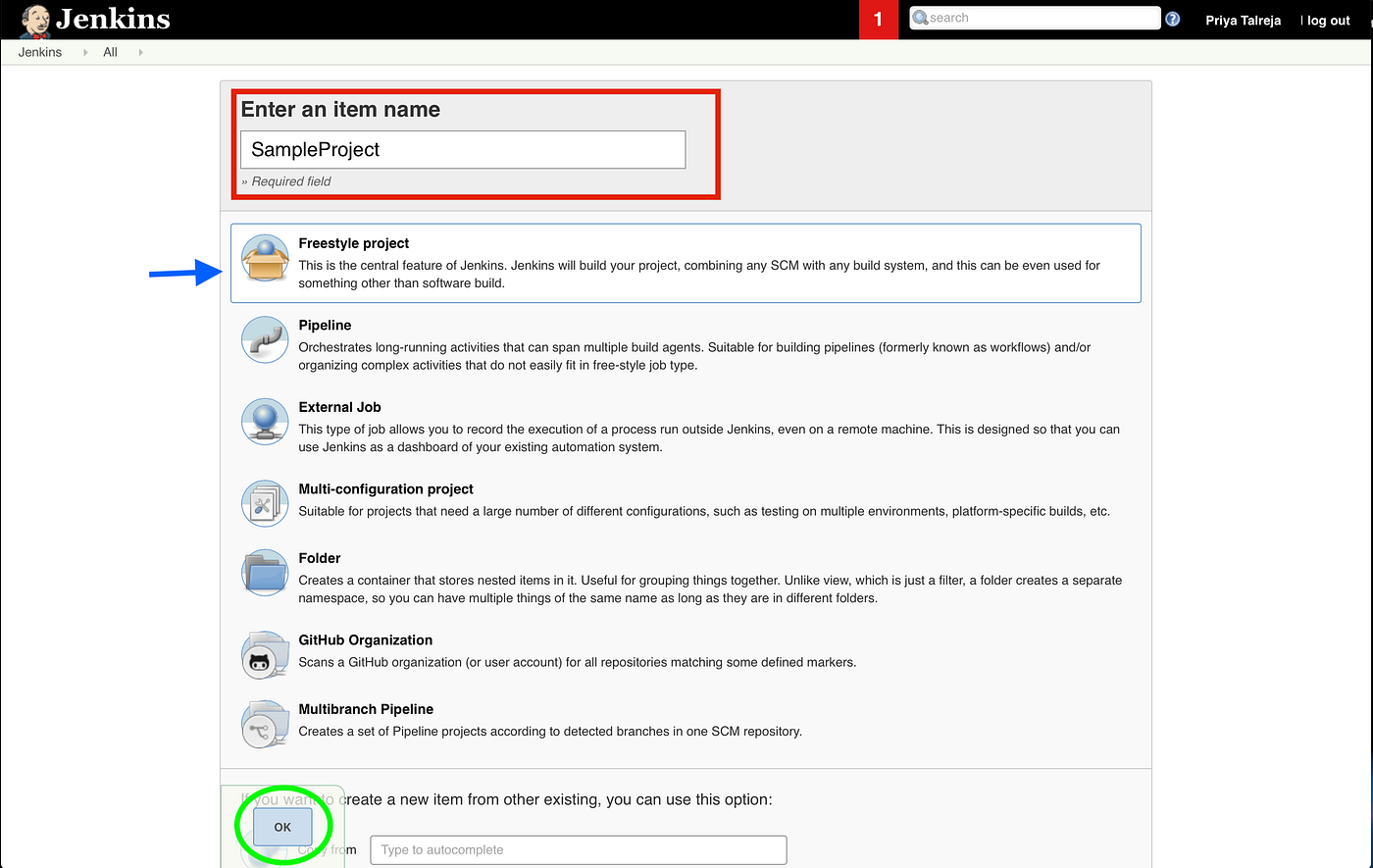
- In General Tab, You can give a description for the project/job created.
- Configure Git in the Source Code Management section.
- Enter the Repository URL and credentials
- Enter the Branch name for which build needs to be created.
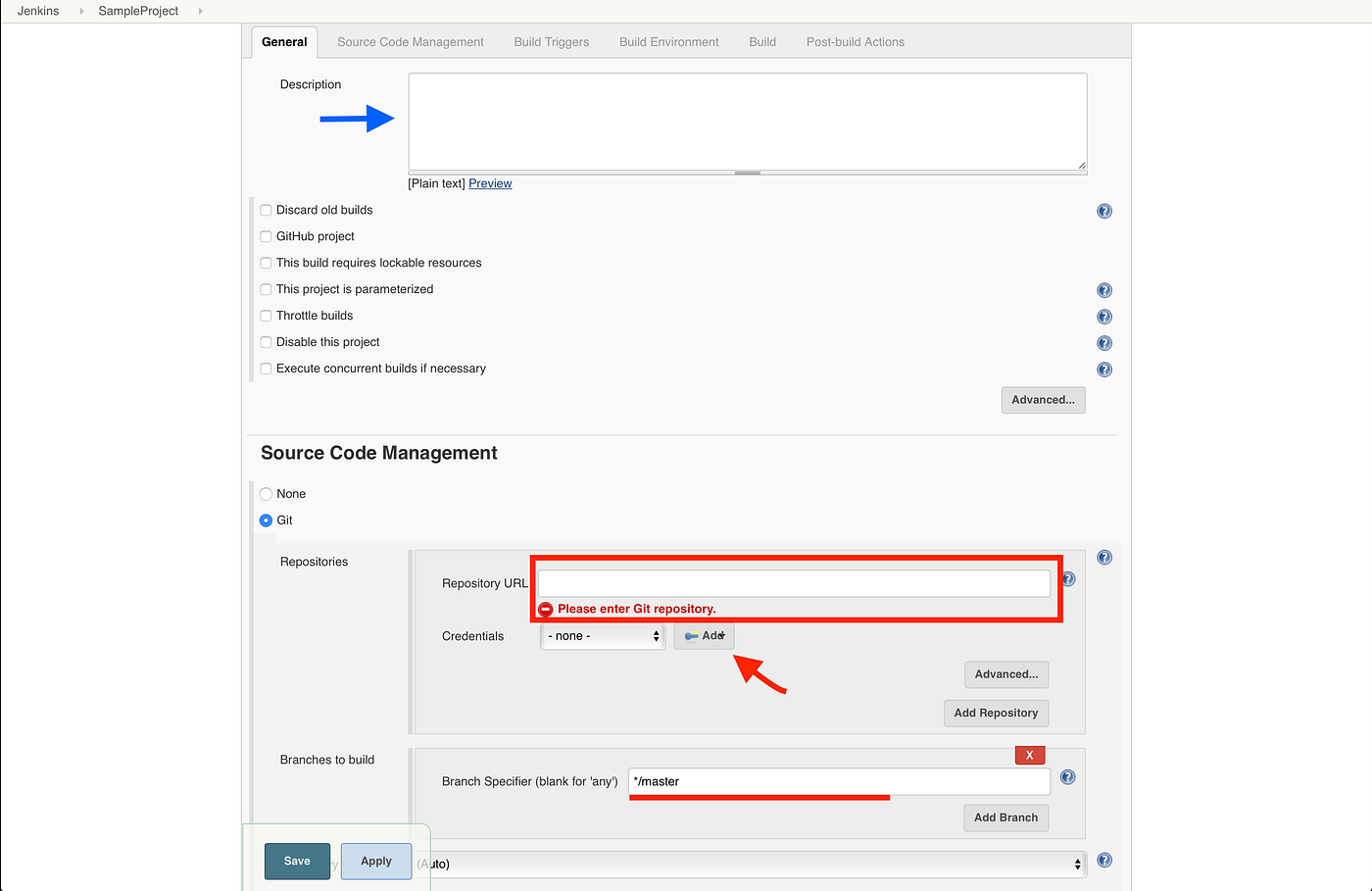
- Click Save.
- Select Build now to run your Jenkins job. Click on Console Output to see the progress of the build. Once the build has succeeded verify workspace in the build job.
- You should find your workspace in the Jenkins Home directory under
/Jenkins/Home/workspace/[Job Name]checked out.
Configuring Fastlane 🚀
Integrate fastlane into your project
- We need to go root folder project of the workspace created by job in jenkins on the terminal and launch the next command line
fastlane init- After running this fastlane command, you will get different options. Select the option you want to do.

- I selected option 2 as I wanted to distribute the build for testing. Fastlane will parse your local Xcode project to find the available schemes and the app identifier. Specify the Scheme
- The setup asks for your Apple-ID and Password which will be stored in your keychain.
After the above steps are completed, it will create a new folder on the root of your project, called fastlane and inside that you will find two files called Appfile and Fastfile.
Fastfile Contents
Open the Fastfile created in the fastlane folder and replace the Fastfile content with below,
default_platform(:ios)platform :ios do      desc “Install pod dependencies”      lane :install_pods do         cocoapods(             podfile: PODFILE_PATH,             use_bundle_exec: false)end

      desc "Incrementing Build Number"
      lane :increment_build do
           current_build_number = latest_testflight_build_number(version: "1.0")
           increment_build_number(
           build_number: current_build_number + 1
           )
      end      desc “Archive and Build IPA”      lane :build_ipa do       install_pods
       increment_build          gym(             workspace: WORKSPACE_NAME,             scheme: SCHEME_NAME,             output_directory: PATH_FOR_IPA,             output_name: IPA_NAME,             export_method: “app-store”,             include_bitcode: false,             clean: true)       end
end
Fastlane Environment Variable Configuration
- On Jenkins Dashboard, Manage Jenkins -> Configure System
- In Global Properties, Environment Variables -> Add
FASTLANE_APPLE_APPLICATION_SPECIFIC_PASSWORD — This is application specific password generated on https://appleid.apple.com . The application specific password will not work if your action usage does anything else than uploading the binary.
FASTLANE_PASSWORD — This is apple developer account password
Integrate Fastlane in Jenkins
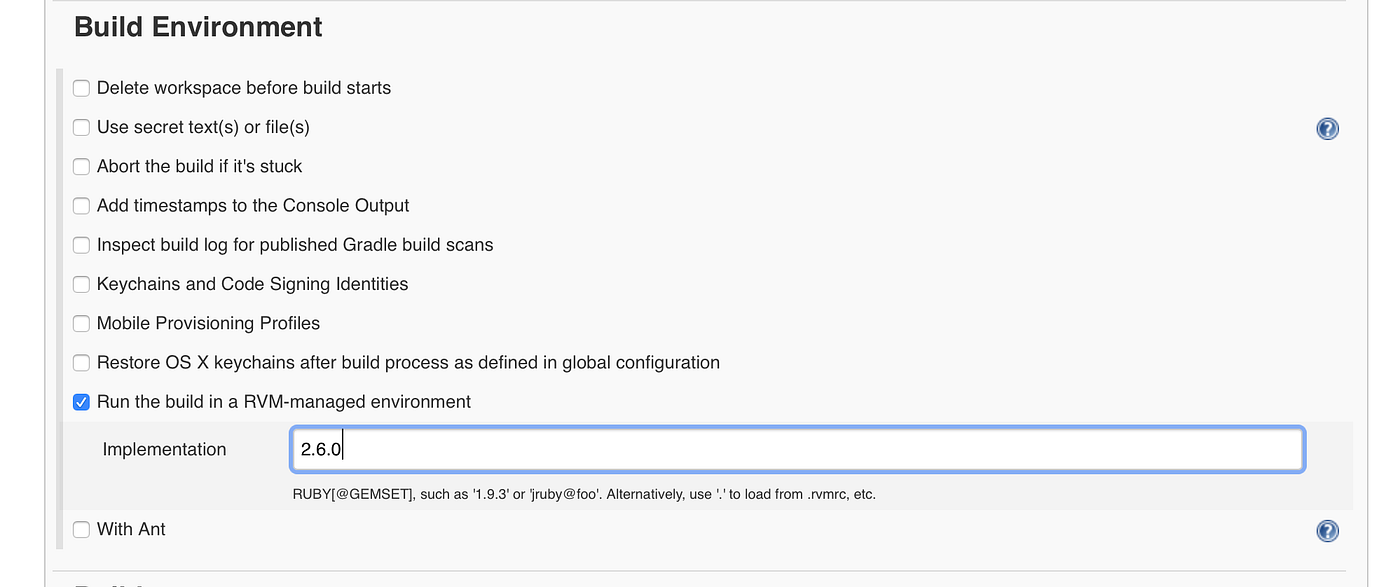
- Configure RVM in Jenkins, install RVM plugin from Manage Plugins in Jenkins.
- In Job Configuration, Select the property Run the build in RVM-managed environment and specify the RVM version in Build Environment Section.
- Now move to Build Section, Add Build Step.
- Execute Shell
Add below commands in the Execute shell,
source $HOME/.bash_profile#security -v unlock-keychain -p PASSWORD /Users/USERNAME/Library/Keychains/login.keychainfastlane build_ipafastlane pilot upload — ipa IPA_PATH
Save and Build the Job. Once the build has succeeded, Verify if Build is uploaded.
How to setup Git LFS in Jenkins is here
Thank you. Hope this helps you. Please let me know if you have any queries.
评论
发表评论